Setting Up Condition Monitoring Events
Legacy documentation
This page is preserved from the previous knowledge base and describes older Treon products and manual configuration workflows. It is kept for reference and is not maintained against current Treon Connect releases.
The Treon Connect Condition Monitoring app allows you to set up warning and alerts to warn you in case specific pre-defined conditions are met. This can be used for condition monitoring to e.g. get information when a temperature threshold has been violated, or when rotating equipment gets unaligned and needs maintenance.
Step 1: Condition App
- Go to the Condition app and choose the Measurements tab. Stay on the Trends (KPI) menu.
- Now select the asset you would like to set up events for.
- Press the Event Rules button to open a new menu.
Step 2: New Condition
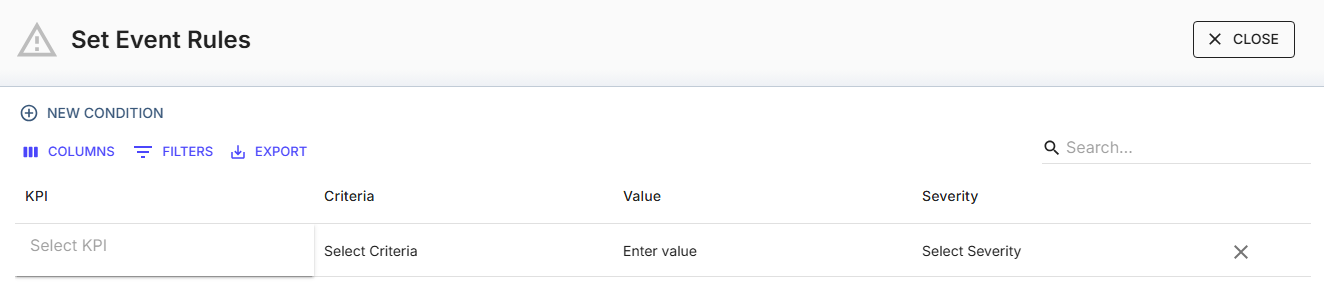
In this menu you can see all previously defined Event Rules for the asset.
- Click New Condition to open a row for a new event rule.

Step 3: Select KPI to be measured as basis
- Select KPI to be measured as basis. You can choose any KPI that is measured with a Treon device on this asset.
Step 4: Select Criteria
- Select one of the following criteria operators to define the relationship of the measured KPI to the value you enter:
******| | | |---|---| | > | Greater than | | < | Less than | | = | Equal | | >= | Greater than or equal to | | <= | Less than or equal to | | != | Not equal to |
Step 5: Enter Value
- Enter a value for the KPI that corresponds with the criteria operator.
Step 6: Select Severity
- Select the severity type. You can choose warnings and alerts, which will show up differently in the Events notification.
**| | | |---|---| | Warning | Lower alarm severity | | Alert | Higher alarm severity |
Upcoming feature: You will be able to combine multiple conditions with AND/OR operators, which will allow you to make several measured values the basis for an alarm.
Example: Temperature Event Rule
When the temperature goes higher than 50°C, a warning will be issued. When the temperature goes higher than 70°C, an alert will be issued.
